
Studio : Le Catnip Collective

Platforms : PC

Type : Multiplayer party game

Skills : Gameplay, AI, UI programming and C++

Time spent on the project : 8 months

Engine and tools : Unreal Engine, Jetbrains Rider, Perforce and Jira.
My contribution
At the start of my contract, I took care of fixing some AI issues like the hound dog and created my own AI to add in the game, which was the rodent. I improved the existing music system and made it sync from server to client. I worked on some improvements in the single player mode like how the cinematics works, the travelling between each floors, and others refinements. I also added other new systems in both multiplayer modes that will be explained further down.
The Hound Dog

When I joined the team, there was already a base with the hound dog. The players can ride it, controlling the dog to go bark at other players, and when the chorus of the song would come up, it would bark at the players randomly. I had to first start by familiarising myself with the project and so upgrading the hound dog was the perfect way for me to get comfortable with the architecture of the game.

Barking behaviour
Instead of the AI randomly choosing a player to bark at, it would first check if the player has already been attacked before for the last 5 seconds as to avoid getting spammed. It would also check if another dog has chosen a player as a target as to avoid getting two dogs at the same time on one player. If those conditions were fullfilled, it can now run towards the chosen player and bark at it. If it checked all the players and none of those conditions are met, it will simply randomly choose a player to avoid the dog doing nothing.

Riding behaviour
As explained above, the player can ride the hound dog and control were it goes. At this point, the dog is no longer an AI, but I’ve added some conditions to force the player off the dog. Items in the game like the cucumber can scare cats and so to have the opportunity to counter attack from other players on the hound dog, I’ve integrated the condition if the cat riding gets scared, it gets booted off the dog.
Another example would be in a FatCat minigame. If the cat eats too much fish, it becomes a beach ball, making it bounce on any surface. If the player picks up enough fish on a hound dog and gets that beachball condition, they eject themselves. Once a player isn’t controlling the dog anymore, it goes back to having it’s normal behaviour.
The Rodent

The rodent is my very own personnal AI added to the game. The rat already existed as a physics objects, but it wasn’t an AI yet. What I had to do what simply make it run away from the players, but this would quickly become complicated in a multiplayer game with multiple different outcomes with the number of players.
Target point prioritization
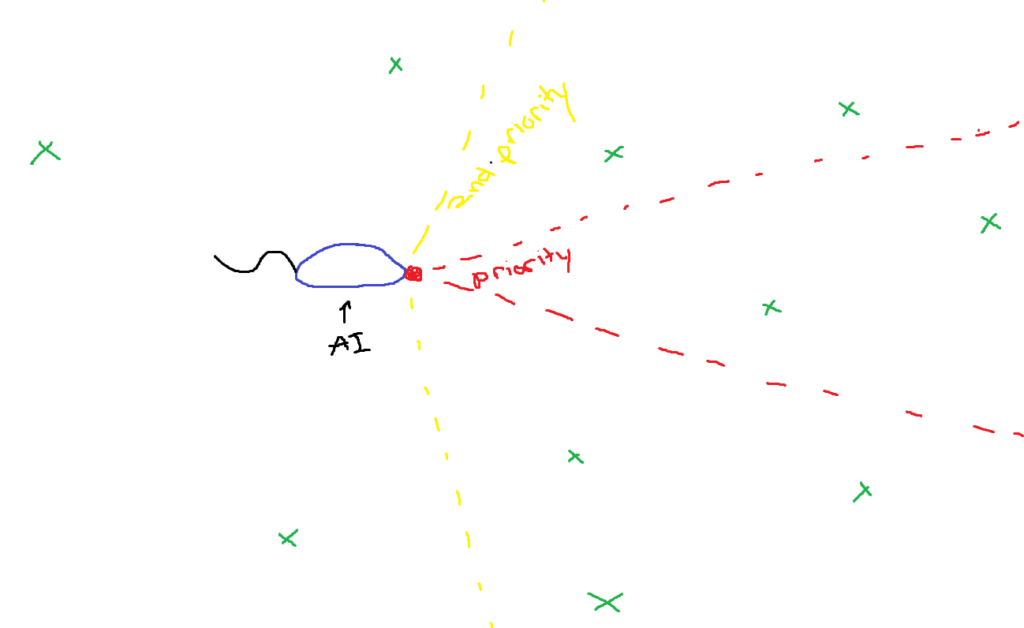
The rodent has a very specific way of calculating where it should go. First off, there are multiple target points scattered around the current level. The rodent then keeps those points in memories and has multiple conditions to check to decide which point will be chosen. If there is a point directly in front of it, it will prioritize that point and move to it. If not, it’s going to check point approximatelly in front of it and chose a random point that meets those condition. To avoid the rodent picking a point on the other side of a wall, which requires to go around, potentially needing to go accross the entire level to get to it, I’ve added a last condition that checks to see if the travel distance is under a certain amount. If the rodent ends up not finding a target, it will simply pick a random point and continues it’s way.
Player influence in direction
There’s a system called the luck system, where each player has points assigned to them depending if they are performing well or not. Lucky players means they are scoring less points and unlucky players the opposite. I’ve integrated this system with the rodent. So lucky players will have a better chance having the rodent in their posession. The way it works is that it calculates which type of player is nearest, lucky or unlucky. If it’s unlucky, it will pick a point away from the player and speed up, making it harder to catch. If a lucky player is near, it will either speed up towards them or slow down, depending if the lucky player is behind or in front of the AI.

Solo Trials

I’ve added a few things to the single player mode of this game. The biggest change was to have different cinematics playing depending on the floor the player is heading and saving the progress so they are not played again each time they change floor.
There is a data-table present in the project for easy access for artists and designers to change the scene depending on which floor the player would arrive via a tunnel travelling mechanic. I’ve added a check to that tunnel to see if the player is travelling towards the new floor and would trigger the event if it’s true. Once the cinematic is finished, it would save that cinematic as triggered and never play again unless of course the save file is reset.
It’s a small change, but enough to make the game feel more polished.
Tournaments
Tournament mode is slightly different then a normal quickplay match, but it was lacking a true reason to chose that mode over quickplay. So I had the task to add some new features.
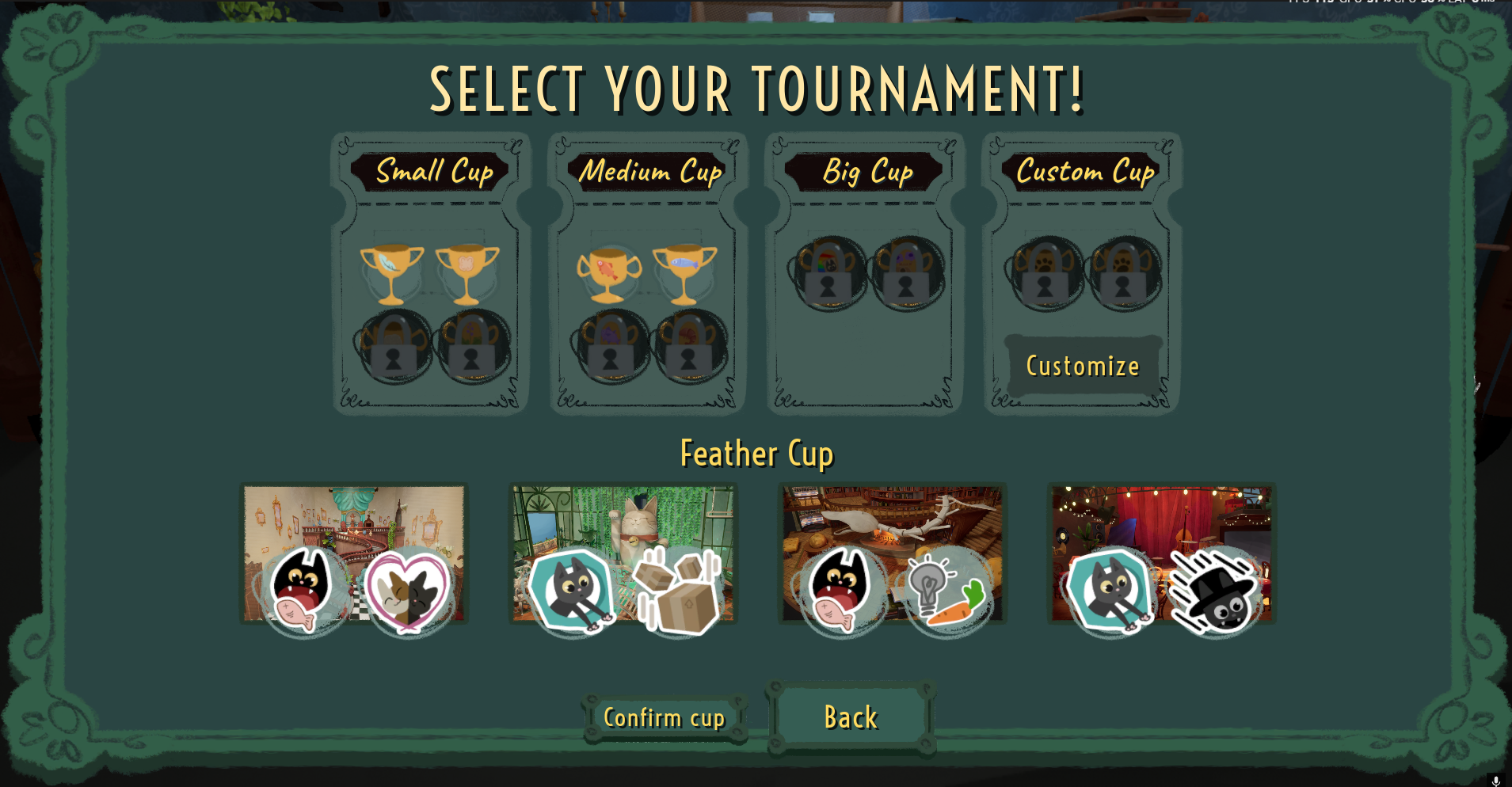

First off, I added the opportunities for players to customize their own tournament cups. They can choose the map, the song that will be played and the minigame for 4 rounds. Their changes are then saved as a preset, so later on they can choose it again or modify it.

Second, when the host chooses a cup, all players can go towards a giant cup in the lobby to see what was selected. A small pop up shows the maps, songs and minigame and is updated whenever a cup is selected or when a custom cup is saved, meaning it was selected.
And finally, another important feature was having locked cups. Every game played in tournament is saved and after a certain amount, it unlocks a category with new cups for the host to choose. The point of adding this was for players to have a reason to play the mode and to have a sense of progress.
The Music System
There were a few issues that were happening with the music system before I made some improvement that fixed them. Players wouldn’t have any music if they joined mid-game or would be out of sync. In addition to fixing that issue, I made it easier to use this system to play music with a simple node with parameters to choose which song or playlist is needed and the time it needs to start if it was ever needed.
Speaking of playlists, it didn’t exist at first. Random songs were played in the lobby and the sound designer needed specific songs played for different modes (Tutorial, quickplay, tournament, solo trials). So I used data assets, easy for the designer to change any music, and each lobby would be assigned a different playlist, pick a random song from the list and play it.
Whenever a client would join a host, it checks the progress of the music the server is at and plays the same song at roughly the same time for the client. This means whenever a client joins a lobby or in the middle of a game, the music will always be synched with the host.
Steam Achievements and In-game Notifications
In-game there was already a system saving the achievements the player was making, but it wasn’t linked to steam. I added all the achievements with the correct image in the steam workshop and read a lot of documentation to add the correct C++ code in the project. While I had to add the right code to the project, I also needed to link the steam achievement system to the existing in-game one, so whenever an unlocked achievement or the progress was updated, it would update on steam.

Not only was steam linked to the existing in-game achievement system, I also added a new feature on top of that. If a player would finish a game and unlocked an achievement during that time, a pop up would appear at the end of the game, prompting the player to head back to the lobby to equip what they unlocked with the achievement.
Bug fixing
I worked closely with the QA team at Lionbridge and used Jira to communicate when bugs were fixed. If a bug wasn’t a bug or that a certain design choice was made linked to the bug report, I would communicate to the QA that reported the bug the reason why it wasn’t a bug.
I had the project manager assign to me the bugs that they judged I was capable of handling and I worked on them in priority QA assigned them as. As a junior programmer at the time, if I ever had too much difficulty with the bug and felt I was starting to take, I wasn’t scared to ask for help and get some guidance.